ShowDontTell — Patient Instruction Cards
A searchable reference tool that converts prescription SIG codes into plain-language, patient-ready instruction cards.
What This Tool Does
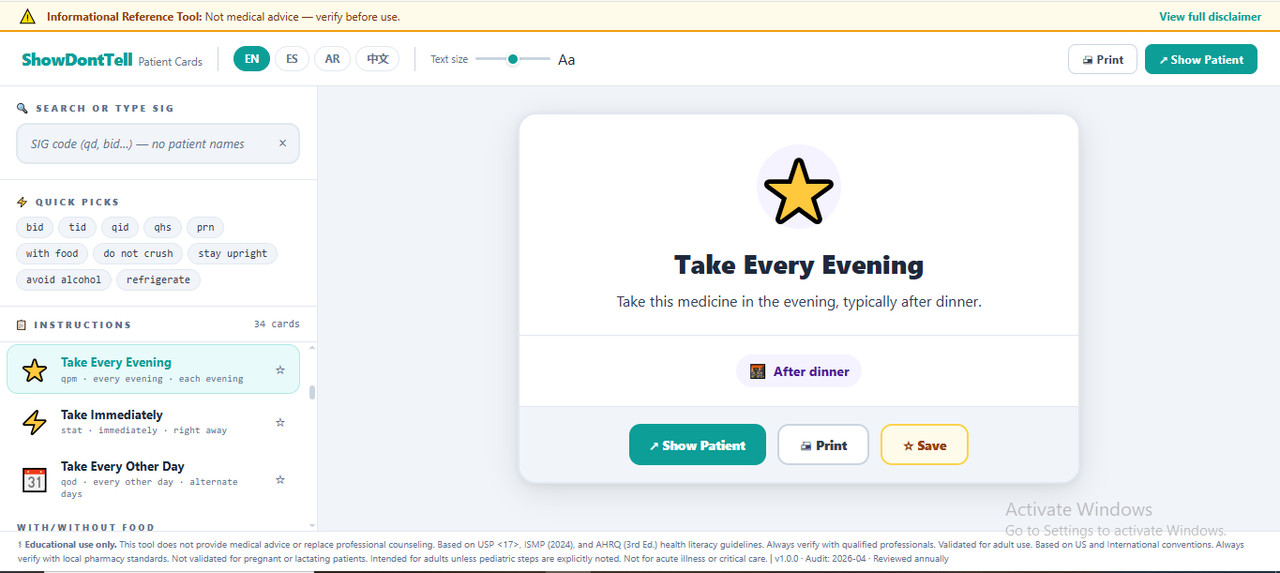
This tool helps pharmacy professionals and pharmacy students turn prescription shorthand (SIG codes like "bid," "qhs," "prn" ) into simplified, plain-language instructions that can be shown or printed directly for a patient. It covers 34 common medication instructions across six categories: Timing, With/Without Food, Special Instructions, Route, Storage, and Safety. It is designed as a patient-counseling communication aid, not a source of clinical decision-making.
The user types a SIG code, an abbreviation, or a plain-language phrase into a search field (or taps one of ten quick-pick shortcuts). The tool matches the input against the SIG code list, the instruction title, and the instruction description at once, and displays the matching instruction card(s) for the user to select. The selected card can then be shown to the patient in a dedicated full-screen "Present Mode," or printed directly.
Features & Functions
- Search matches on more than one field at once — the SIG abbreviation, the instruction title, and the instruction description, in the language currently selected.
- Ten one-tap quick-pick shortcuts for the most common instructions (bid, tid, qid, qhs, prn, with food, do not crush, stay upright, avoid alcohol, refrigerate).
- 34 pre-written instruction cards across 6 categories (Timing, With/Without Food, Special Instructions, Route, Storage, Safety).
- Save any instruction card to a personal favorites list, stored locally for quick access next time.
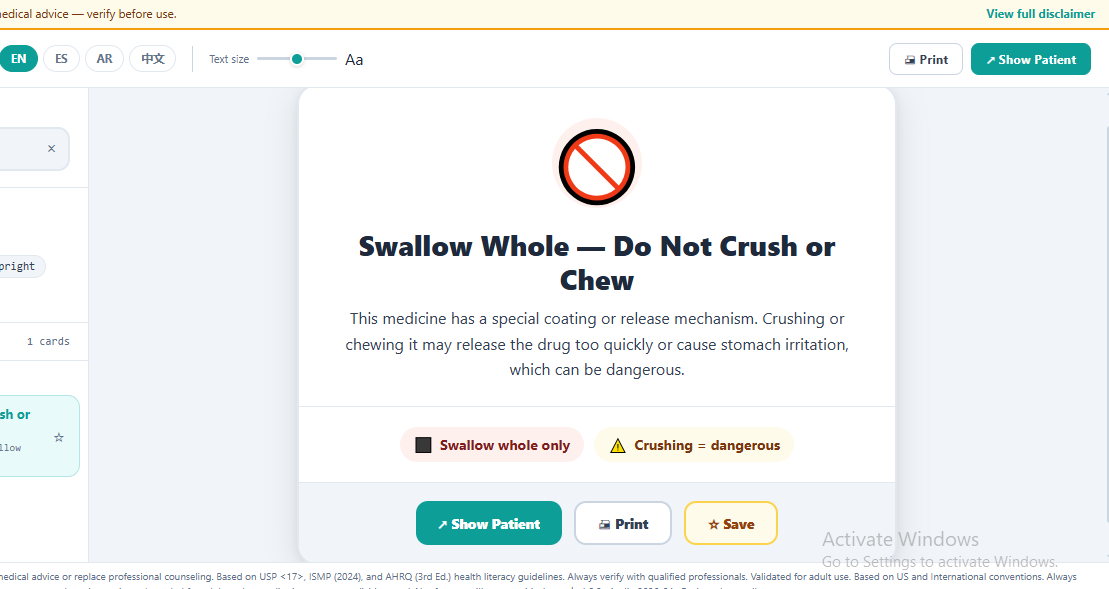
- Full-screen "Show Patient" presentation mode, designed to be shown directly to a patient at the point of care.
- Within Present Mode, step through multiple matching cards in sequence without leaving full-screen view.
- Adjustable on-screen text size in the browse view — the selected size carries over automatically into Present Mode.
- Full interface available in four languages (English, Spanish, Arabic, Chinese), including right-to-left layout for Arabic.
- One-tap printing of the currently selected instruction card.
- On-screen warning when a typed abbreviation has more than one recognized clinical meaning (e.g., "OD" can mean "once daily" or "right eye").
How to Use This Tool
- Type a SIG code or plain-language phrase into the search box, or tap a quick-pick shortcut.
- Select the matching instruction card from the results list on the left.
- Review the patient-ready card shown on the right.
- Tap "Show Patient" to display it full-screen for the patient, or "Print" to print it.
- Optionally tap the star icon to save the card to your favorites list.
- Switch the interface language or adjust text size at any time from the header controls.
Technical Specifications
| Format | Single HTML file |
|---|---|
| File Size | ~102 KB |
| Compatibility | Chrome, Firefox, Safari, Edge (current versions — not tested against specific version numbers ) |
| Internet Required | No (works 100% offline) |
| Installation | None — open file in any browser |
| Language | English, Spanish, Arabic, Chinese (interface) |
| Version | 1.0.0 |
| Last Updated | April 2026 |
| Validation | AI based Check-and-fix cycles — expert review required |
| Status | AI-generated educational prototype |
Who Should Use This
Designed For:
- Pharmacy professionals and pharmacy staff preparing patient-ready medication instructions
- Pharmacy and health-profession students learning patient counseling language
- Reference during patient counseling or for printed take-home instructions
NOT Designed For:
- Clinical decision-making or patient care
- Professional certification or licensing exams
- Production use without expert validation
- Pregnant or lactating patients (not validated for this population)
- Pediatric use, unless a specific step explicitly says so
- Acute illness or critical-care settings
Quality & Compliance
This tool includes 14 verified features:
Your Data & Privacy:
- Works entirely offline — no internet connection needed
- No external servers or third-party connections — nothing is transmitted anywhere
- On-screen reminder not to enter patient names into the search field
- Saved favorites are stored only in your browser and never leave your device
Reliability & Compatibility:
- Works in current versions of Chrome, Firefox, Safari, and Edge
- Lightweight file (~102 KB) — opens instantly, nothing to install
- Keyboard-accessible interface with screen-reader labels on every interactive element
Sources & Transparency:
- Version number and last-updated date shown directly in the tool
- Clinical sources cited in the tool (USP <17>, ISMP 2024, AHRQ 3rd Ed.)
Scope & Limitations:
- States which patient populations this tool does not cover (pregnant/lactating, pediatric unless noted, acute illness/critical care)
- Includes a note on regional/local pharmacy standard variation
- Shows specific examples of what not to use the tool for
- Includes a fixed-content notice — this tool does not update automatically
- Flags on-screen when a searched abbreviation has more than one recognized clinical meaning
Validation Process:
This tool was refined through iterative AI based check-and-fix cycles covering: Logic and functionality, Scientific content accuracy, Compliance and safety.
License Terms
Allowed:
- Personal educational use
- Internal training within your organization
- Academic coursework and self-study
Not Allowed:
- Production or operational use without expert validation
- Redistribution or resale (unless Commercial Resale License purchased)
- Clinical decision-making for patient care
- Removing or modifying disclaimers
Provided "as-is" for educational purposes only. All outputs must be independently verified by qualified professionals before any real-world application. This tool reflects a completed development stage and may see further refinement in future updates.
Our Fair Price Philosophy
We've enabled the 'Pay What You Want' option so you can download and evaluate the tool for free. If you find it valuable and useful to your practice, we encourage you to return and contribute a price that feels right to you and fairly reflects the value this interactive resource brings to your practice.
Your Feedback Matters
We are constantly working to improve our tools. After using ShowDontTell, we would be grateful if you could share your thoughts on its functionality and usefulness.
✉️ Send Us Your FeedbackGet ShowDontTell Today
(Suggested Price: $7 - $13 | Pay What's Fair)
Download the single HTML file instantly and start converting SIG codes offline.
Download The Tool