ExamFlow
A study-calendar tool for pharmacy certification exam candidates.
What This Tool Does
ExamFlow organizes exam-blueprint study topics into a personal calendar for candidates preparing for NAPLEX, BCPS, or PTCB certification. It is a scheduling and tracking tool — it does not teach content, test competency, or certify exam readiness.
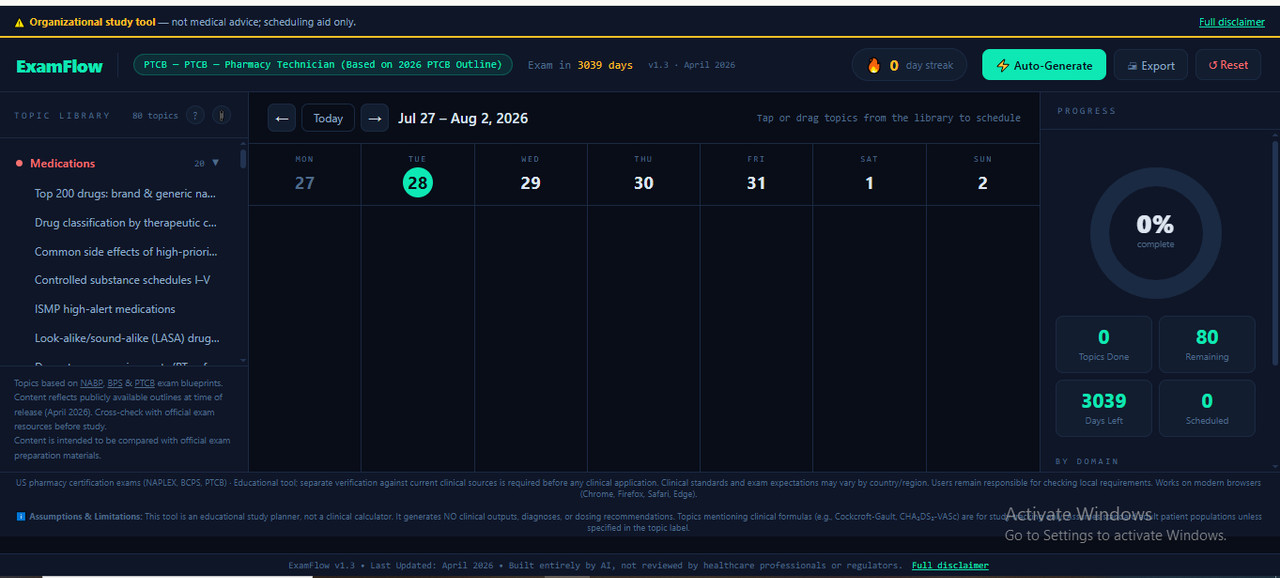
After choosing an exam and a target date, the user builds a study calendar either by manually dragging individual topics onto specific days or by using the auto-generate function (choosing which days of the week to study and how many topics per day ). Each day can be opened to review its assigned topics and mark them complete. Topic lists are drawn from each exam's published blueprint (NABP for NAPLEX, BPS for BCPS, PTCB for PTCB), with source citations shown inside the tool.
Features & Functions
- Three certification tracks to choose from — NAPLEX, BCPS, and PTCB — each with its own topic/domain blueprint
- Live countdown showing days remaining until the selected exam date
- Auto-generate function that distributes topics across chosen study days and a set number of topics per day
- Manual drag-and-drop placement of individual topics onto any calendar day
- Day view for reviewing a single day's assigned topics
- Per-topic completion tracking (mark individual topics done / not done)
- Progress panel showing overall and per-domain completion
- Reference panel listing the source blueprint and guideline citations for each exam
- Print/export function for the study calendar
- Progress saves automatically in the browser and stays in sync across browser tabs open to the tool
How to Use This Tool
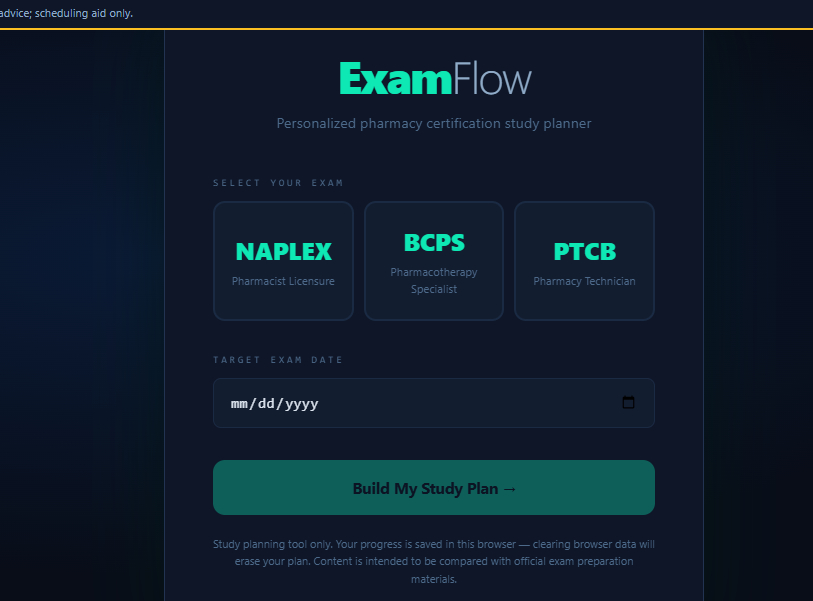
- On the setup screen, choose your certification exam (NAPLEX, BCPS, or PTCB ) and enter your target exam date
- The calendar view opens, showing a live countdown to your exam date
- Either drag topics from the reference panel onto calendar days yourself, or click "Auto-Generate" to distribute them automatically across chosen study days
- Click any day to view its assigned topics and mark individual ones complete
- Track your overall and per-domain progress in the progress panel
- Print or export your calendar at any time
Technical Specifications
| Format | Single HTML file |
|---|---|
| File Size | ~98 KB |
| Compatibility | Chrome, Firefox, Safari, Edge (modern versions) |
| Internet Required | No (works 100% offline) |
| Installation | None — open file in any browser |
| Language | English |
| Version | 1.3 |
| Last Updated | April 2026 |
| Validation | AI based Check-and-fix cycles — expert review required |
| Status | AI-generated educational prototype |
Who Should Use This
Designed For:
- Pharmacy students and candidates preparing for NAPLEX, BCPS, or PTCB certification
- Self-directed candidates organizing study time against official exam-blueprint topics
- Personal study planning and progress tracking
NOT Designed For:
- Clinical decision-making or patient care
- Professional certification or licensing exams
- Production use without expert validation
- Teaching or explaining topic content — it schedules topics, it does not present or test the material itself
Quality & Compliance
This tool includes 13 verified features:
Your Data & Privacy:
- Works 100% offline — no internet connection required
- No data collection — all progress is stored locally in your browser only
- Zero external script or style dependencies
- Detects and warns on accidental entry of sensitive information (email addresses, Social Security numbers, phone numbers) in the notes field
Reliability & Compatibility:
- Works on modern browsers — Chrome, Firefox, Safari, Edge
- Lightweight file (~98 KB) — opens instantly
- Input validation with clear error messages (e.g., rejects invalid or past exam dates)
Sources & Transparency:
- Version number and last-updated date shown in the tool
- Source citations included and linked in-app (NABP, BPS, PTCB, ACC/AHA, USP, Surviving Sepsis Campaign)
- States its own assumptions and scope limitations directly in the tool
Scope & Limitations:
- States which exams and geographic region the content is scoped to, with a regional-variation warning
- Lists specific examples of what not to use the tool for
- Notes that content is fixed as of a stated date, with no automatic updates
Validation Process:
This tool was refined through AI based iterative check-and-fix cycles covering: Logic and functionality, Scientific content accuracy, Compliance and safety.
License Terms
Allowed:
- Personal educational use
- Internal training within your organization
- Academic coursework and self-study
Not Allowed:
- Production or operational use without expert validation
- Redistribution or resale (unless Commercial Resale License purchased)
- Clinical decision-making for patient care
- Removing or modifying disclaimers
Provided "as-is" for educational purposes only. All outputs must be independently verified by qualified professionals before any real-world application. This tool reflects a completed development stage and may see further refinement in future updates.
Our Fair Price Philosophy
We've enabled the 'Pay What You Want' option so you can download and evaluate the tool for free. If you find it valuable and useful to your practice, we encourage you to return and contribute a price that feels right to you and fairly reflects the value this interactive resource brings to your practice.
Your Feedback Matters
We are constantly working to improve our tools. After using ExamFlow, we would be grateful if you could share your thoughts on its functionality and usefulness.
✉️ Send Us Your FeedbackGet ExamFlow Today
(Suggested Price: $7 - $13 | Pay What's Fair)
Download the single HTML file instantly and start organizing your study schedule offline.
Download The Tool