StemMaster
A flashcard, quiz, and reference tool for learning drug-name stem conventions used in pharmacology.
What This Tool Does
StemMaster is an offline HTML tool for learning drug-name stem conventions — the suffixes and prefixes (such as -pril, -mab, -vastatin ) that indicate a drug's class or mechanism in pharmacology naming. It is designed for pharmacy, nursing, medical, and other health-science students studying drug nomenclature. It addresses the recurring study task of memorizing and recognizing stem-to-class relationships across a broad range of drug categories, rather than looking each one up individually.
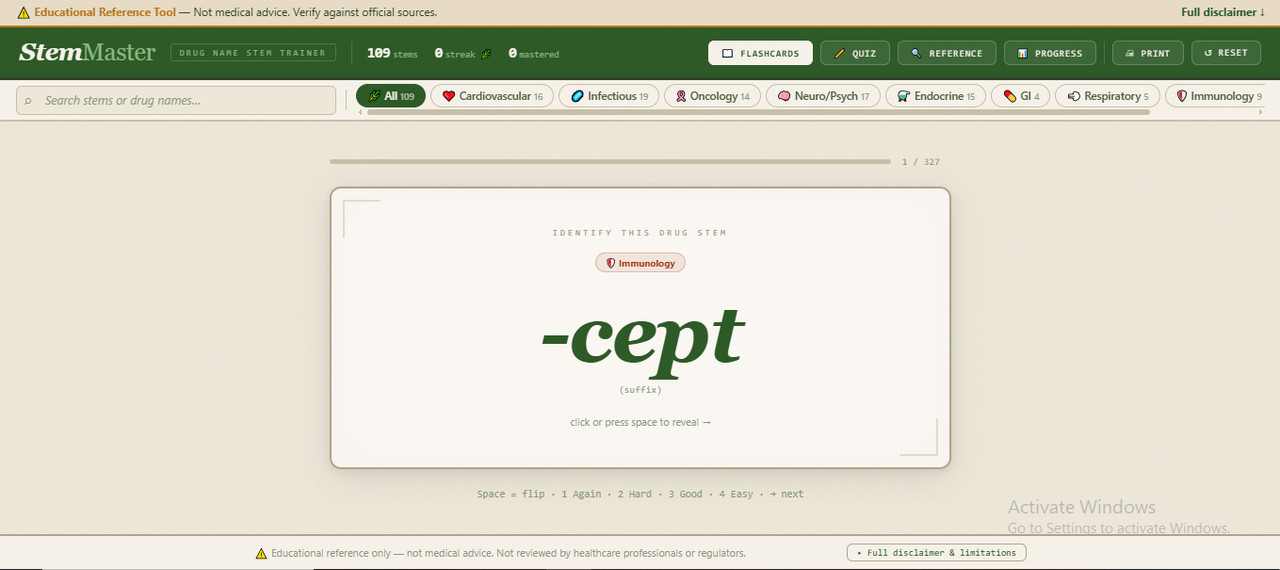
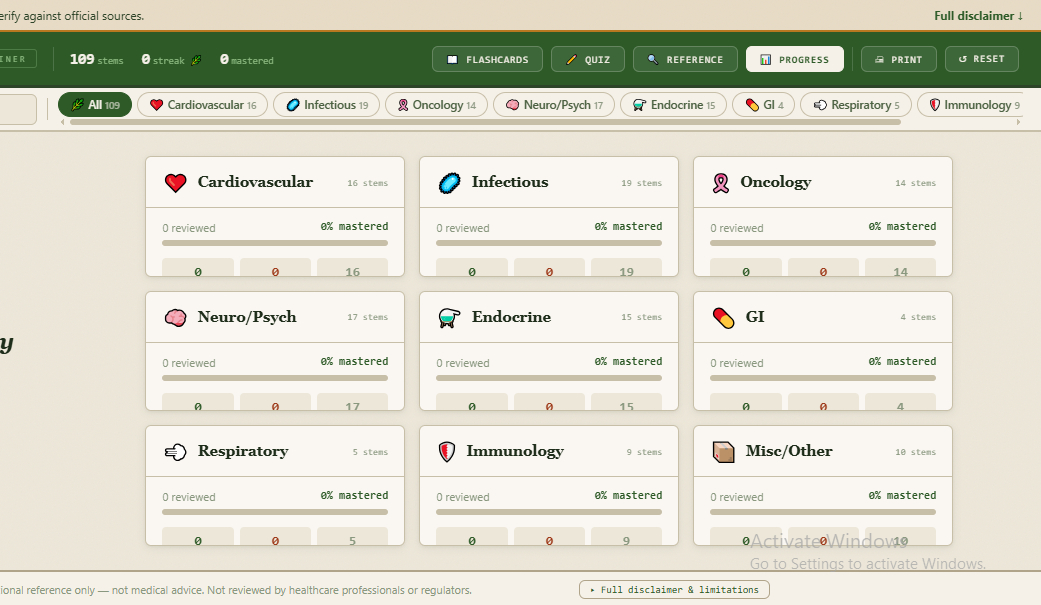
The tool contains 109 drug-name stem entries organized into 9 categories (Cardiovascular, Infectious, Oncology, Neuro/Psych, Endocrine, GI, Respiratory, Immunology, and Misc/Other). Each entry lists the stem itself, its drug class, its mechanism, and example drug names. Users move between four modes — Flashcards, Quiz, Reference, and Progress — depending on whether they want to study, test themselves, look something up, or check how they're doing.
Features & Functions
- Flashcard mode with a four-option self-rating system (Again / Hard / Good / Easy) after flipping each card
- Cards you rate lower reappear more often on later passes; cards you rate highest are shown less often but still occasionally resurface for review
- A streak counter tracks consecutive correct ratings/answers, with a separate best-streak record
- Multiple-choice quiz mode with a running correct/wrong score
- Search box matches on more than one field at once — you can type either a stem (e.g. "-pril") or an actual drug name (e.g. "lisinopril") and get the same result
- Category filter chips let you narrow flashcards, quiz, or the reference table to one of the 9 categories, each showing a live count of entries
- Reference mode: a full searchable table of all 109 entries, sortable by browsing category, with a print function for a paper copy
- Progress mode: a per-category breakdown showing how many stems are reviewed, mastered, still need work, or not yet seen, with a mastery percentage bar for each category
- Overall header stats: total stem count, current streak, and total mastered count, visible at all times
- Keyboard shortcuts: Space or Enter to flip a flashcard, number keys 1–4 to rate it, arrow key to advance
- Progress, ratings, and quiz scores are saved automatically between sessions on the same device
- Flashcards and mode-switch buttons are keyboard-navigable and labeled for screen readers
How to Use This Tool
- Open the HTML file in any browser — no installation or internet connection needed
- On first open, read the disclaimer screen and click "I Understand" to continue
- Start in Flashcards mode: read the stem side, click the card (or press Space/Enter ) to flip it, then rate yourself with Again / Hard / Good / Easy
- Optionally narrow the deck first using the category chips at the top, or type a stem or drug name into the search box
- Switch to Quiz mode to answer multiple-choice questions and track your correct/wrong score
- Switch to Reference mode to search or browse the full table of entries, or click Print for a paper copy
- Switch to Progress mode at any time to see your mastery breakdown by category
- Progress is saved automatically — closing and reopening the file keeps your ratings, scores, and streak
Technical Specifications
| Format | Single HTML file |
|---|---|
| File Size | ~116 KB |
| Compatibility | Modern browsers (Chrome, Firefox, Safari, Edge) — built with standard web features; not version-tested individually |
| Internet Required | No (works 100% offline) |
| Installation | None — open file in any browser |
| Language | English |
| Version | 1.0 |
| Last Updated | 2026-07-15 |
| Validation | AI based Check-and-fix cycles — expert review required |
| Status | AI-generated educational prototype |
Who Should Use This
Designed For:
- Pharmacy, nursing, medical, and other health-science students studying drug-name nomenclature
- Self-study and exam-practice supplementing (not replacing) coursework
- Quick reference while reviewing drug classes
NOT Designed For:
- Clinical decision-making or patient care
- Professional certification or licensing exams as sole preparation
- Production use without expert validation
- Dosing, interaction-checking, or any calculation-based task — the tool contains no calculators
Quality & Compliance
This tool includes 12 verified features:
Your Data & Privacy:
- Works 100% offline — no internet connection needed
- No data collection — all progress stays on your device (browser local storage)
- Zero external dependencies — no fonts, scripts, or content loaded from the internet
Reliability & Compatibility:
- Lightweight file (~116 KB) — opens instantly, no installation needed
- Error handling for storage issues, with a clear on-screen message if progress can't be saved
- Keyboard-accessible flashcards and labeled controls for screen readers
Sources & Transparency:
- Version number and last-updated date shown in the tool
- General data-source basis stated, with U.S.-specific regulatory notes flagged where they appear
- States clearly that content is static and may not reflect the newest approvals or safety updates
Scope & Limitations:
- States who the tool is designed for and what it does not cover
- Flags that some regulatory notes are U.S.-specific and may not apply elsewhere
- Includes specific examples of what NOT to use the tool for
Validation Process:
This tool was refined through AI based iterative check-and-fix cycles covering: Logic and functionality, Scientific content accuracy, Compliance and safety.
License Terms
Allowed:
- Personal educational use
- Internal training within your organization
- Academic coursework and self-study
Not Allowed:
- Production or operational use without expert validation
- Redistribution or resale (unless Commercial Resale License purchased)
- Clinical decision-making for patient care
- Removing or modifying disclaimers
Provided "as-is" for educational purposes only. All outputs must be independently verified by qualified professionals before any real-world application. This tool reflects a completed development stage and may see further refinement in future updates.
Our Fair Price Philosophy
We've enabled the 'Pay What You Want' option so you can download and evaluate the tool for free. If you find it valuable and useful to your practice, we encourage you to return and contribute a price that feels right to you and fairly reflects the value this interactive resource brings to your practice.
Your Feedback Matters
We are constantly working to improve our tools. After using StemMaster, we would be grateful if you could share your thoughts on its functionality and usefulness.
✉️ Send Us Your FeedbackGet StemMaster Today
(Suggested Price: $7 - $13 | Pay What's Fair)
Download the single HTML file instantly and start mastering drug nomenclature offline.
Download The Tool